BA Case Study · Live Product
MiniTune
A macOS menu-bar music app taken from problem statement to real users in public beta.
Business Analysis
Product Delivery
Jira Backlog
RAG Support Agent
Context
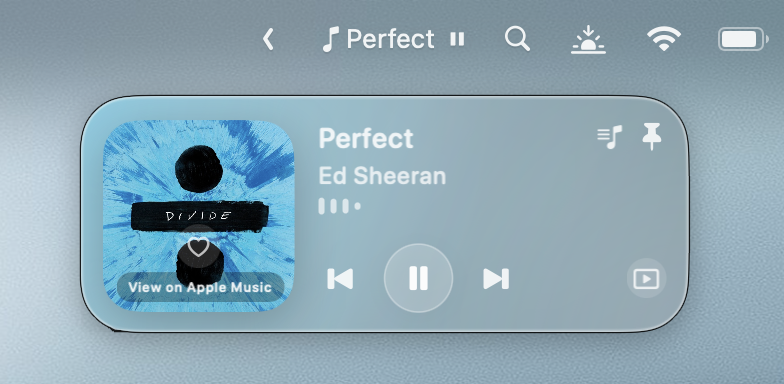
A menu-bar app controlling YouTube (in Safari) and Apple Music from a floating player, with no tab-hunting.
Problem
Music control lives outside your working context, buried in a tab or a full player. Every change costs a context switch.
Discovery
Who it's for: user personas
Three primary personas, built from how real desktop workers actually listen while they work. Each one pushed a different requirement into scope.
Emma Nguyen
"If I only want to pause or skip, I should not have to go hunting for the right tab or app first."
Goals
- Pause, resume or skip without breaking focus
- Controls accessible without opening full apps
- Clean now-playing info at a glance
Pain points
- Safari tabs are hard to locate across windows
- Music.app must come forward for simple changes
- Full players feel heavy for one-click actions

Daniel O'Connor
"I want playback control to live where I already am, not in a background tab I have to find again."
Goals
- One-click control from the menu bar
- No app switching for routine actions
- Lightweight, predictable UI
Pain points
- Playback source hidden behind coding windows
- Losing keyboard focus mid-flow is irritating
- Inconsistent state between app and controls
Priya Shah
"When I want a different song, I want to get there instantly instead of reopening the player and starting again."
Goals
- Jump to a different song quickly
- Browse favourites without a full player
- Simple control on a small laptop screen
Pain points
- Too many tabs make music hard to find
- Track changes break study concentration
- Big player apps take over the screen
Journey
The moment that mattered
Journey mapping found the make-or-break moment: changing a track mid-task, without losing your place.
Trigger
A track needs pausing, skipping or changing while the user is mid-task.
Locate
Before: hunt through Safari windows or drag Music.app forward.
With MiniTune: glance at the menu bar and the player is already there.
Act
Before: a full player UI for a one-click action.
With MiniTune: play, pause, skip or switch source in one click.
Refocus
Before: focus broken, window layout disturbed.
With MiniTune: straight back to work. Nothing took over the screen.
Design
Low-fi wireframes
The player was scoped on wireframes first, cheap to argue about and cheap to throw away.

Menu-bar entry point
The whole product starts from one icon. No Dock, no window.
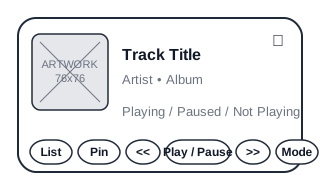
Mini player: default
Artwork, track info and six controls. Nothing else made the cut.
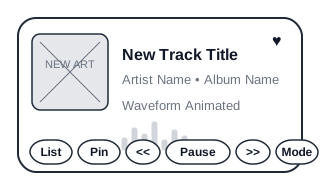
Playing state
State changes had to be obvious at a glance, which is a core persona need.
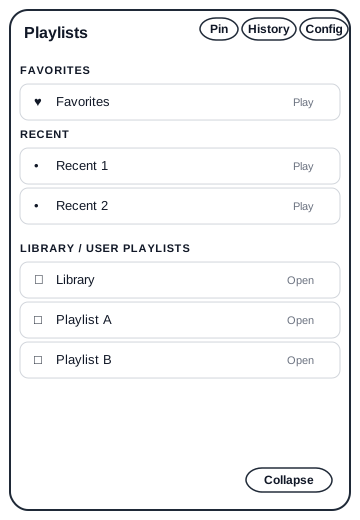
Playlist pane
Priya's requirement: browse and jump tracks without a full player.
Shipped
From wireframe to shipped UI
The same screens, live in the product today. The layout contract from the wireframes survived contact with real users.
Player view
The shipped player: artwork, track info and one-click controls.
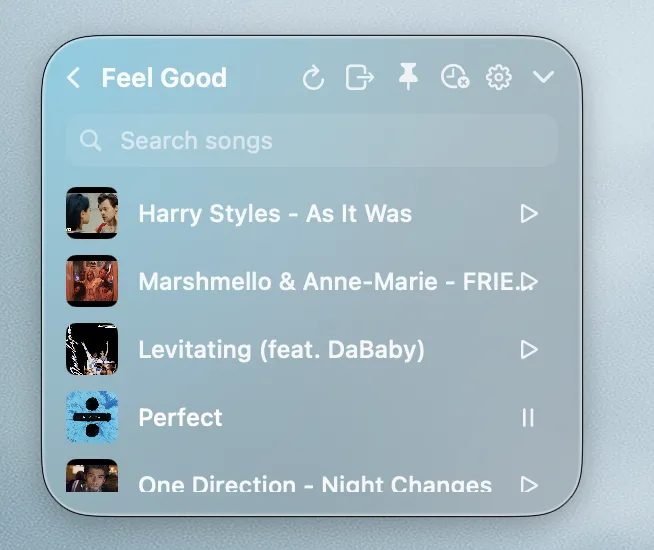
Playlist access
Playlists kept close to the active work surface.

Menu-bar playback
Compact playback visibility without leaving the current task.

State consistency
Consistent controls across player states.
Delivery
The real Jira backlog
Managed as a real backlog: epics, stories with acceptance criteria, MoSCoW priorities.
13 epics
35 stories
87 issues total
Kanban operating model
| Summary | Type | Priority | Points | Fix version |
|---|---|---|---|---|
| EP01 Playback Monitoring & Controls | Epic | High | n/a | 0.9.1 |
| EP02 YouTube Mode Reliability (Safari Automation) | Epic | High | n/a | 0.9.1 |
| EP06 Library, Favourites & Playlists UX | Epic | High | n/a | 0.9.1 |
| Play/Pause control reflects actual state (YouTube + Music) | Story | High | 3 | 0.9.1 |
| Improve Safari tab selection coverage (youtu.be, profiles, YouTube Music) | Story | High | 3 | 0.9.1 |
| Loved toggle updates Apple Music and local favourites gracefully | Story | Medium | 3 | 0.9.1 |
| Music Mode artwork rule: MusicKit first, then local artwork, then fallback | Story | Medium | 3 | 0.9.1 |
| Playlist context indicator is subtle and accurate | Story | Medium | 2 | 0.9.1 |
The full 87-issue export, including acceptance criteria on every story, is available in the artefact pack below.
Operate
After launch: the support loop
Shipping was the midpoint. minitune.app runs a 24/7 RAG support agent that answers users, refuses what it doesn't know, and triages the rest into the backlog.
Outcome
The full BA lifecycle on a live product: personas, journey map, backlog, and a support loop feeding real feedback back in.
Artefact pack
Inspect the real documents
Every document below is the genuine working artefact, not a mock-up for the portfolio.
Product Requirements Document
Problem, scope, functional requirements and release approach.
Open PRDUser personas pack
The three personas above in full, with behaviours and product opportunities.
Open personasJira backlog export
All 87 issues with descriptions, acceptance criteria, points and versions.
Download CSVBA portfolio pack
The consolidated BA deliverable set for the deployment workstream.
Open pack